Showing posts with label whatsapp. Show all posts
Showing posts with label whatsapp. Show all posts
Wednesday, September 9, 2015
How to Run Multiple Whatsapp Account on Android
If you run dual SIM in your Android smartphones, you might be willing to enjoy two separate WhatsApp account for your two different telephone. These are the instructions to run multiple Whatsapp account on any rooted Android Phone.
Today, I am introducing you two different Android apps - OGWhatsApp and SwitchMe -that allows users to run multiple WhatsApp accounts on a single smartphone.
OGWhatsApp is an Android app that allows you to use two separate WhatsApp accounts on your single Android device without any need to root your Android device.
While running your normal WhatsApp account on your smartphone, you can follow some simple steps (below) in order to run a different WhatsApp account on the OGWhatsApp.
Step 1: Take a complete backup of your WhatsApp data and restore it.
Step 2: Delete all the WhatsApp data by going to Settings>apps>WhatsApp>Clear Data.
Step 3: Rename the /sdcard/WhatsApp directory to /sdcard/OGWhatsApp. You can use any file manager for Android to do this task, or from Windows.
Step 4: Uninstall your original WhatsApp app from your Android device.
Step 5: Now Install OG Whatsapp in your Android smartphone.
Step 6: Once installed, remember to verify your old number that was previously registered with the original WhatsApp to OGWhatsApp. That is it.
Step 7: Now re-install the official WhatsApp for your other number from the play store.
This is crazy:
Enjoy two separate WhatsApp accounts for both telephone numbers on your single Android device without even rooting your Android device.
Here’s the deal:
Switchme multiple account app allows you to log in and out of multiple user spaces however it needs root access to do this. However, users cannot access the other profile from their current profile because each account within the multiple profiles will have its settings, applications, and data.
Step 1: Root your Android device.
Step 2: Make sure that you have WhatsApp app installed on your smartphone.
Step 3: Install SwitchMe on your smartphone.
Step 4: Run SwitchMe Multiple accounts, it will ask for Superuser request that you need to grant.
Step 5: Now create a user profile with your name in SwitchMe app. This profile will be an administrator account containing all the current apps and settings, and will also reflect your WhatsApp profile that is already installed on your smartphone.
Step 6: Now create another profile using a different name by tapping on the Create Profile button in SwitchMe app, and then choose the Switch option by selecting this account.
Step 7: Now your smartphone will restart automatically and once it is ready to use, install official WhatsApp again from Google Play Store and register it for the different phone number. That is it.
Congratulations!
Now you can easily use multiple WhatsApp accounts on your single Android smartphone. The Free version of SwitchMe Multiple accounts app allows you to use only two user account.
Today, I am introducing you two different Android apps - OGWhatsApp and SwitchMe -that allows users to run multiple WhatsApp accounts on a single smartphone.
How to Run Multiple Whatsapp Account on Android
METHOD 1: USING OGWhatsApp
OGWhatsApp is an Android app that allows you to use two separate WhatsApp accounts on your single Android device without any need to root your Android device.
While running your normal WhatsApp account on your smartphone, you can follow some simple steps (below) in order to run a different WhatsApp account on the OGWhatsApp.
Follow these simple steps to go:
Step 1: Take a complete backup of your WhatsApp data and restore it.
Step 2: Delete all the WhatsApp data by going to Settings>apps>WhatsApp>Clear Data.
Step 3: Rename the /sdcard/WhatsApp directory to /sdcard/OGWhatsApp. You can use any file manager for Android to do this task, or from Windows.
Step 4: Uninstall your original WhatsApp app from your Android device.
Step 5: Now Install OG Whatsapp in your Android smartphone.
Step 6: Once installed, remember to verify your old number that was previously registered with the original WhatsApp to OGWhatsApp. That is it.
Step 7: Now re-install the official WhatsApp for your other number from the play store.
This is crazy:
Enjoy two separate WhatsApp accounts for both telephone numbers on your single Android device without even rooting your Android device.
METHOD 2: USE SWITCHME TO RUN MULTIPLE ACCOUNTS
SwitchMe is another Android app that allows you to have two separate WhatsApp accounts on a single Android device, but this app requires your Android smartphone be rooted.Here’s the deal:
Switchme multiple account app allows you to log in and out of multiple user spaces however it needs root access to do this. However, users cannot access the other profile from their current profile because each account within the multiple profiles will have its settings, applications, and data.
Follow these simple steps to go:
Step 1: Root your Android device.
Step 2: Make sure that you have WhatsApp app installed on your smartphone.
Step 3: Install SwitchMe on your smartphone.
Step 4: Run SwitchMe Multiple accounts, it will ask for Superuser request that you need to grant.
Step 5: Now create a user profile with your name in SwitchMe app. This profile will be an administrator account containing all the current apps and settings, and will also reflect your WhatsApp profile that is already installed on your smartphone.
Step 6: Now create another profile using a different name by tapping on the Create Profile button in SwitchMe app, and then choose the Switch option by selecting this account.
Step 7: Now your smartphone will restart automatically and once it is ready to use, install official WhatsApp again from Google Play Store and register it for the different phone number. That is it.
Congratulations!
Now you can easily use multiple WhatsApp accounts on your single Android smartphone. The Free version of SwitchMe Multiple accounts app allows you to use only two user account.

WhatsApp+ v4.0 apk app Full Unlocked
Full install App WhatsApp+ v4.0 free Android
WhatsApp+ Requirements: Android OS 2.1 +WhatsApp+ Overview: What is WhatsApp+? Basically it is a customizable WhatsApp where you can change lots of colours, sizes, and many other visual MODs In addition you can increase upload media limit (stock limit is 16Mb) to send large music files or videos.
You can increase quality of pictures sent (by default resolution is decreased quite a lot) You can share music just with one click You can add contact profile pictures to their chats You can hide contact profile pictures and show phonebook pictures (in chat screen) Built-in theme viewer and downloader. Check WhatsApp+ users themes online and apply theme if you like And more to come Remember to previously uninstall whatsapp if you come from the official version (if not you will get the "not installed" error)
*New Bubble: CARD (thanks to djsubtronic)
*Added Dutch & Portuguese BZ translation. Added Hindi (75% translated). Arabic updated and improved
*Other minor bugs solved
What's new in WhatsApp+ v4.0 apk :
*Base updated to web version: 2.11.7 (connection improvements with Wi-Fi, add image multi-send capability, fix battery drain issue related to wakelocks, bug fix for notification tones on sd cards, miscellaneous bug fixes, translations and improvements)*New Bubble: CARD (thanks to djsubtronic)
*Added Dutch & Portuguese BZ translation. Added Hindi (75% translated). Arabic updated and improved
*Other minor bugs solved
More info about WhatsApp+ v4.0 apk:
https://plus.google.com/communities/115581747781287569882Direct Download link for WhatsApp+ v4.0 apk
APK + SD InstallFree download whatsapp messenger for Android
Whatsapp messenger for Android

A list of WhatsApp Messenger’s features is given below. This list doesn’t speak all about the app and it just describes the main features which are prominent in the app and are loved by Android and other smartphone users.
Whatsapp messenger Features:
- WhatsApp is 100% free for the first year
- A very low fee of just $0.99 for an entire year onward
- Supports almost all major mobile OS brands
- Send photos, audios, videos and traditional text messages
- Receive media rich messages from your loved ones on the go
- Call your friends for free
- Group chat feature of the app has made group conversations a breeze for smartphone users
- Allows you to use your computer for sending messages to your WhatsApp contacts
- Free across borders – no additional charges when you make any call to any person living abroad
- No usernames and PINs are needed to be remembered!
- Access messages later when you go offline for some reason
This was a brief list of WhatsApp Messenger’s features. Several other features are there about which we haven’t talked here.
Whatsapp Messenge Previous versions:
whatsapp messenger Latest Version:
The latest version of the WhatsApp Messenger is v2.12.150 as of June 24, 2015. You can download WhatsApp Messenger APK file of this version at below provided download link. Moreover, you can download any other version too if you need an older version of the app. Download links of older versions of the app are also given below.
Free download whatsapp messenger via below Links:
Download WhatsApp Messenger APK – v2.12.150 (Updated on June 24, 2015)
WhatsApp Messenger 2.11.432 APK
WhatsApp Messenger 2.11.432 is best and latest android messenger to download in APK for free and your can chat with it for free because it uses your Wi-Fi or 3G connection. You can also send many pictures, videos and voice messages to your friends and family member for free with this android communication app. Besides this, it also helps you to spend your free time with your friends for free. Download WhatsApp Messenger 2.11.432 APK to enjoy following features.

WhatsApp Messenger 2.11.432 APK
- No hidden cost and you can make unlimited massages to your friends after downloading android APK communication app.
- You are also able to send pictures, videos and voice messages to your contacts in WhatsApp Messenger 2.11.432 APK.
- Group chat feature allows making group conversations with your friends in this best android messenger APK app.
- You can send free SMS and other media files for free all over the globe and you will never cost any international charges WhatsApp android app.
- You need not to log in while using WhatsApp Messenger 2.11.432 APK because it is always connected to internet.
- This best android Communication APK app stores offline messages and you are not to loose any single SMS in WhatsApp Messenger APK.
- Besides this, this android app contains many other features and you can enjoy all for free.
- Size of android communication application is 14.69 MB and its current version is 2.11.432.
- Download and install on 2.1 and up android OS for smoother and better performance.
- You can see full features, functions, screen shots and full detailed description about WhatsApp Messenger APK from Google Play store.
Also read about : Skype 4.9 Apk Free Download
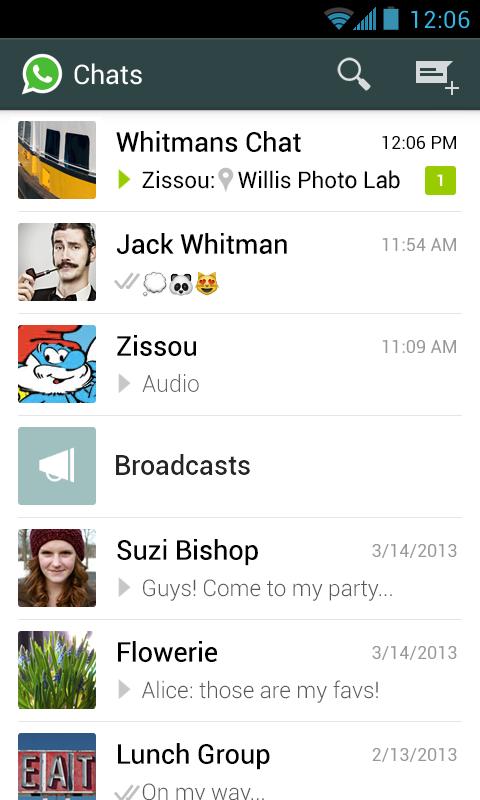
WhatsApp Messenger Apk – screenshots
Now all features of WhatsApp Messenger 2.11.432 are in front of you and you can make free SMS to you friend and other contacts after downloading. If you want to send free videos, picture and other voice massages to your friends then you should download android communication app for your Smartphone or tablet. Download WhatsApp messenger form given link below the picture and have fun online with your friends. Don’t forget to give your comments below about APK app for our feedback. Download, install and enjoy android communication app for free.WhatsApp Messenger 2.11.339 apk app
WhatsApp Messenger Application Info:
Full Name:WhatsApp MessengerShort Name:WhatsApp Messenger
Google ID:com.whatsapp
Version:2.11.339
Size:16.66 MB
Category:Applications
Sub Category:Communication
Developer:Brian Acton
Whats New in WhatsApp Messenger :
2.11.301bug fixes and improvements
WhatsApp Messenger Min System Requirements
CPU : armeabi,armeabi-v7a,mips,x86Android Version : Eclair 2.1
Screen : small
WhatsApp Messenger Permissions
android.permission.ACCESS_COARSE_LOCATIONandroid.permission.ACCESS_FINE_LOCATION
android.permission.ACCESS_NETWORK_STATE
android.permission.ACCESS_WIFI_STATE
android.permission.AUTHENTICATE_ACCOUNTS
android.permission.CAMERA
android.permission.CHANGE_WIFI_STATE
android.permission.GET_ACCOUNTS
android.permission.GET_TASKS
android.permission.INSTALL_SHORTCUT
android.permission.INTERNET
android.permission.MANAGE_ACCOUNTS
android.permission.MODIFY_AUDIO_SETTINGS
android.permission.READ_CONTACTS
android.permission.READ_PHONE_STATE
android.permission.READ_PROFILE
android.permission.READ_SYNC_SETTINGS
android.permission.READ_SYNC_STATS
android.permission.RECEIVE_BOOT_COMPLETED
android.permission.RECEIVE_SMS
android.permission.RECORD_AUDIO
android.permission.SEND_SMS
android.permission.STORAGE
android.permission.USE_CREDENTIALS
android.permission.VIBRATE
android.permission.WAKE_LOCK
android.permission.WRITE_CONTACTS
android.permission.WRITE_EXTERNAL_STORAGE
android.permission.WRITE_SETTINGS
android.permission.WRITE_SYNC_SETTINGS
com.android.launcher.permission.INSTALL_SHORTCUT
com.android.launcher.permission.UNINSTALL_SHORTCUT
com.android.vending.BILLING
com.google.android.c2dm.permission.RECEIVE
com.google.android.providers.gsf.permission.READ_GSERVICES
com.sec.android.provider.badge.permission.READ
com.sec.android.provider.badge.permission.WRITE
com.whatsapp.permission.C2D_MESSAGE
com.whatsapp.permission.MAPS_RECEIVE
com.whatsapp.permission.VOIP_CALL
Watch Video tutorial How to Download OGWhatsapp
WhatsApp Messenger Screens shot


Get WhatsApp Messenger.apk
Subscribe to:
Posts (Atom)